Blender Add-on

Story Bob

A complete storyboarding toolkit for Blender + Grease Pencil — built from real moments of friction in my own pipeline. One-click fill, instant camera framing, reference paste, hand-drawn effects, and phone-gyro control.

v2.0.0 · Blender 4.4+ · Windows · Free

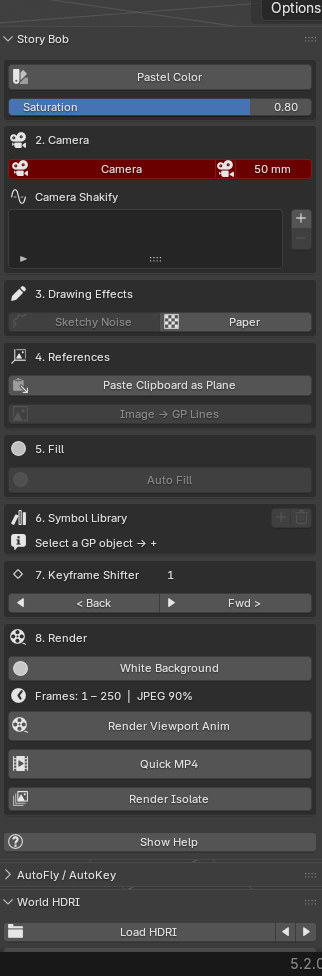
The Story Bob panel in Blender's sidebar, showing all v2.0 tools

The whole toolkit

One sidebar. Every storyboarding tool.

Story Bob v2.0 lives in a single View3D → Sidebar → Story Bob tab — and every tool is its own panel you can drag into the exact order you work in, or collapse when you don’t need it: Pastel Color, Camera + Shakify, Drawing Effects, References, Fill, AutoFly / AutoKey, Keyframe Shifter, Symbol Library, a full Render section, World HDRI, Cursor Snapper, and the Gyro phone controller.

Pastel Color

Pastel Color — Instant Readability

One click assigns a soft pastel shade to your selected objects so character, prop, and background each read as their own element — grey-on-grey soup becomes a legible composition. Saturation slider built in.

Tutorial video coming soon Pastel Color

Camera

Camera List, F1 Passepartout & Shakify

A compact camera list — select, view-through, and set focal length for every camera from one row. Press F1 to toggle the passepartout mask. Camera Shakify layers handheld wobble onto the scene camera.

Tutorial video coming soon Camera

Drawing Effects

Sketchy Noise & Paper

Sketchy Noise keeps clean Grease Pencil lines feeling hand-drawn with subtle jitter. Paper drives a painterly compositor look — switch to Rendered to see your boards on a paper sheet.

Tutorial video coming soon Drawing Effects

References

Paste Clipboard & Image → GP

Snip any reference (Win+Shift+S) and paste it straight into the viewport as an image plane with Ctrl+Shift+V. Or trace a reference image directly into editable Grease Pencil strokes — drop, click, iterate.

Tutorial video coming soon References

Fill

Auto Fill — One-Tap Flats

Arms Blender’s native Fill tool on a "Fills" layer below your drawing — click inside the sketch and it fills in one tap, gap-aware (native 5.2 Delaunay). Your line art stays untouched on its own layer.

Tutorial video coming soon Fill

AutoFly / AutoKey

AutoFly & AutoKey — Animate by Performing

AutoFly records the camera live as you fly the viewport. AutoKey arms a record mode: move, rotate, or scale a selected object and it lays down keyframes that follow your motion, stepping the frame forward as you go — click empty space to finish. Then Smooth Keys softens the recorded curves in the Graph Editor with one press.

Tutorial video coming soon AutoFly / AutoKey

Keyframe Shifter

Keyframe Shifter

Push every key after the playhead forward or back together — objects, Grease Pencil frames, and timeline markers all at once. Quick timing changes without dragging in the dope sheet. F5 / Shift+F5.

Tutorial video coming soon Keyframe Shifter

Symbol Library

Symbol Library — Flash, inside Blender

Turn any Grease Pencil drawing into a reusable symbol. Edit the master once and every instance updates everywhere. Frame Offset staggers an instance’s timing, hide/lock keep your scene tidy.

Tutorial video coming soon Symbol Library

Render

White Background, Quick MP4, Render Isolate & Sequence

White Background drops a pure-white backdrop behind everything — in renders and the viewport — while your lights keep working. Render Viewport Anim writes a JPEG sequence; Quick MP4 renders the whole timeline to one H.264 file. Render Isolate exports the selected object as a transparent PNG straight to your clipboard, and Render Isolate Sequence does it across the timeline as an alpha PNG sequence through your scene camera.

Tutorial video coming soon Render

World HDRI

World HDRI — Light & Mood in One Click

Load an HDRI to light your scene and set the mood instantly, then dial it in with strength and horizontal / vertical rotation sliders. Cycle through a whole folder of HDRIs to find the right look without leaving the panel.

Tutorial video coming soon World HDRI

Cursor Snapper

Cursor Snapper & Re-project

Snap the active Grease Pencil object to the cursor’s First point, Center, or Base, lock a layer so it stays put, and jump between keyframes with snap-on-arrival. Re-project Strokes flattens your drawing back onto the working plane.

Tutorial video coming soon Cursor Snapper

Gyro

Gyro Phone Controller

Move, rotate, and draw in Blender using your phone as a motion controller over Wi-Fi. One Start button launches the server; copy the link to your phone and tilt to control — sensitivity, axes, and ports all adjustable. Great for loose, gestural blocking.

Tutorial video coming soon Gyro

Help

Built-in Help & Movable Panels

Flip on Show Help for a one-line guide under every tool, right in the panel. And because every section is its own panel, you can drag them into the exact order you storyboard in — or collapse the ones you’re not using.

Tutorial video coming soon Help

Install

Two ways to install

Drag to install

  1. Make sure Blender 4.4 or newer is open.
  2. Drag the “Drag to Blender to Install” button (above) onto your Blender window.
  3. Blender asks to confirm — click OK. Done.

Manual install

  1. Click Download .zip above.
  2. In Blender: Edit → Preferences → Add-ons → Install from Disk.
  3. Select the downloaded story-bob.zip and enable it.
  4. Find the Story Bob tab in the 3D viewport sidebar (press N).

Want to learn storyboarding in Blender?

I'm putting together tutorials, breakdowns, and — soon — 1-on-1 mentorship and small-group workshops for artists who want to go deeper into storyboarding with Blender + Grease Pencil.